
Choosing a laser engraver is relatively easy when you only work with one or two materials. But once your projects expand from wood and acrylic to metal, plastic, glass or crystal, a single laser source can quickly become limiting.
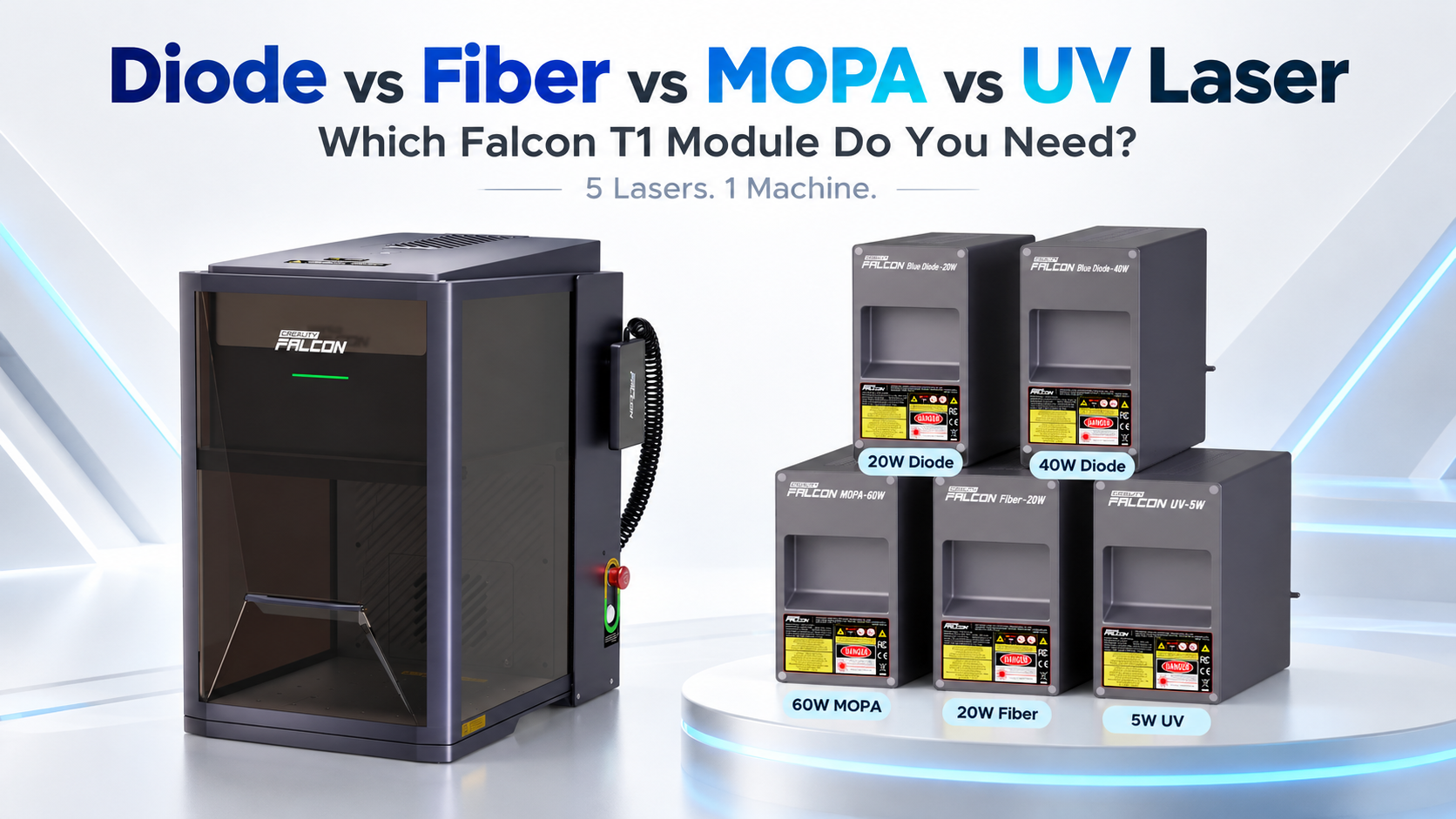
That is where the Creality Falcon T1 5-in-1 Laser Engraver becomes interesting.
Instead of locking you into one laser technology, Falcon T1 supports five interchangeable laser modules:
- 20W Diode Laser
- 40W Diode Laser
- 20W Fiber Laser
- 60W MOPA Laser
- 5W UV Laser
The modules can be swapped in around 15 seconds without tools, allowing one machine to cover very different materials and applications.
But which Falcon T1 module should you actually choose?
The answer depends much more on what you want to make than on which module has the highest wattage.
Quick Answer: Which Falcon T1 Laser Should You Choose?
| Your Main Use | Recommended Module |
|---|---|
| Wood, leather, MDF and acrylic | 20W Diode |
| Thicker wood and acrylic cutting | 40W Diode |
| Metal engraving and marking | 20W Fiber |
| Colour engraving on stainless steel and titanium | 60W MOPA |
| Glass, crystal, plastics and delicate materials | 5W UV |
| General small-business production | 40W Diode + 20W Fiber |
If most of your work involves wood, acrylic and craft materials, start with a diode laser.
If you mainly personalise metal products, choose fiber.
If coloured metal engraving is important to your business, MOPA is the specialist option.
And if you need extremely fine marking on glass, crystal or heat-sensitive materials, UV is usually the better choice.
1. Diode Laser: Best for Wood, Acrylic and Everyday Making
For most makers, the diode module is the easiest place to start.
Falcon T1 offers two diode options:
- 20W Diode
- 40W Diode
Both operate at approximately 445 nm and are designed for materials including wood, MDF, bamboo, PU leather, ceramics, coated metals and certain acrylics.
What Is a Diode Laser Best At?
- Wood engraving
- Wood cutting
- MDF
- Leather
- Bamboo
- Cardboard
- Dark acrylic
- Coated metal
- Painted surfaces
- General craft projects
If you want to make signs, personalised gifts, decorations, wooden products or acrylic items, diode is probably the module you will use most often.
Falcon T1 20W Diode
The 20W version offers a good balance between engraving performance and cutting capability.
Under suitable conditions, it can cut approximately:
- 8 mm basswood
- 6 mm non-transparent acrylic
It makes sense for hobbyists, home studios and smaller custom-product businesses that mainly engrave rather than perform heavy cutting.
Falcon T1 40W Diode
The 40W module is the better option if cutting is a major part of your workflow.
Under suitable settings, it can cut approximately:
- 12 mm basswood
- 10 mm non-transparent acrylic
That extra power is useful if you manufacture signs, boxes, ornaments, display pieces or larger batches of wood products.
Choose 20W Diode if: You mainly engrave and occasionally cut thinner material.
Choose 40W Diode if: You expect to cut wood and acrylic frequently or want higher production capacity.
2. Fiber Laser: Best for Metal Engraving
Diode lasers are excellent for wood, but bare metals are a completely different challenge. This is where the 20W Fiber Laser module becomes much more useful.
Falcon T1's fiber module operates at approximately 1064 nm and is suitable for metals such as:
- Stainless steel
- Aluminium
- Brass
- Copper
- Iron
- Gold
- Silver
- Titanium
What Can You Make with a Fiber Laser?
- Metal business cards
- Tools
- Jewellery
- Nameplates
- Serial numbers
- QR codes
- Logos
- Machine parts
- Metal tags
- Personalised tumblers
Fiber is particularly attractive for businesses because metal products often have a much higher perceived value than basic wooden engraving.
If bare metal engraving is one of your main goals, fiber is the much more appropriate choice than a standard diode module.
3. MOPA Laser: Best for Colour Metal Engraving
At first glance, MOPA and fiber lasers may look very similar. Both Falcon T1 modules operate around 1064 nm and both can engrave metals.
The main difference is the greater pulse control available with MOPA, making the 60W MOPA module particularly suitable for advanced metal processing and colour marking.
Why Choose MOPA Instead of Standard Fiber?
One of MOPA's biggest advantages is colour engraving on materials such as stainless steel and titanium.
This makes it particularly interesting for:
- Coloured stainless-steel engraving
- Titanium jewellery
- Premium metal gifts
- Watch components
- Branded metal products
- Decorative metal artwork
- High-end customisation
Fiber: General-purpose metal engraving, deep marking and some colour marking.
MOPA: Better suited to advanced, controllable colour engraving on stainless steel and titanium.
4. UV Laser: Best for Glass, Crystal and Heat-Sensitive Materials
The 5W UV module is one of the most specialised Falcon T1 options. It operates at approximately 355 nm, a much shorter wavelength than diode and fiber lasers.
UV lasers can process materials with extremely fine detail and relatively low thermal impact, making them especially useful for delicate and heat-sensitive surfaces.
What Is the UV Module Best For?
- Glass
- Crystal
- Acrylic
- Plastics
- Ceramics
- PU leather
- Cardboard
Falcon T1's UV system can also support 3D internal crystal engraving when used with the appropriate compatible setup.
With a spot size of approximately 0.014 mm, the 5W UV module is designed for extremely fine marking and detailed work on materials such as glass, crystal and plastics.
Diode vs Fiber vs MOPA vs UV: Full Comparison
| Feature | Diode | Fiber | MOPA | UV |
|---|---|---|---|---|
| Falcon T1 Power | 20W / 40W | 20W | 60W | 5W |
| Wavelength | ~445 nm | ~1064 nm | ~1064 nm | ~355 nm |
| Best For | Crafts & cutting | Metal marking | Advanced metal work | Fine & delicate marking |
| Wood | Excellent | Poor | Poor | Limited |
| Bare Metal | Limited | Excellent | Excellent | Specialist |
| Colour Metal Engraving | No | Limited | Excellent | No |
| Glass & Crystal | Limited | Limited | Limited | Excellent |
Which Falcon T1 Module Is Best for Beginners?
For most beginners, we would recommend the 20W Diode.
It covers the widest range of common maker projects and works particularly well with affordable and easy-to-source materials such as wood, MDF and leather. If you already know that cutting thicker wood or acrylic will be a major part of your work, the 40W Diode may be the better starting point.
Which Module Is Best for a Small Business?
For a general personalised-product business, one of the strongest combinations is:
40W Diode + 20W Fiber
Diode: Wood, acrylic, leather, signs and decorations.
Fiber: Metal products, jewellery, tools, tags and corporate gifts.
If your business later expands into premium metal personalisation, you can add MOPA. If you begin offering crystal, glass or sensitive plastic products, you can add UV.
Do You Need All Five Falcon T1 Modules?
Probably not.
And that is exactly the point of a modular system.
Start with the laser technology that matches the materials you already use, then add another module when your projects or business require it.
Falcon T1's tool-free quick-change system allows modules to be exchanged in around 15 seconds, helping one workstation cover a much wider range of applications.
Falcon T1 Module Recommendations by User Type
Hobby Maker — 20W Diode
Best for wooden gifts, decorations, leather items and small craft projects.
Etsy or Personalisation Business — 40W Diode
Better cutting performance for repeat production. Add Fiber later if you want to expand into metal.
Jewellery Maker — 20W Fiber
Ideal for detailed metal engraving. Consider MOPA if colour engraving is important.
Metal Customisation Business — 60W MOPA
Best suited to advanced metal processing and colour engraving.
Glass or Crystal Gift Business — 5W UV
The specialist choice for glass, crystal and fine-detail products.
Multi-Material Workshop — Diode + Fiber
Start with the most versatile combination and add UV or MOPA as demand grows.
One Machine, Different Laser Technologies
The biggest advantage of the Creality Falcon T1 isn't simply that it has a powerful laser. It is that you don't have to commit to one laser technology forever.
Wood and acrylic → Diode
Metal → Fiber
Colour metal engraving → MOPA
Glass, crystal and delicate materials → UV
Falcon T1 combines these technologies in one modular platform, alongside a high-speed galvo system capable of engraving speeds up to 10,000 mm/s.
It also uses a fully enclosed Class 1 laser safety design during normal closed-cover operation.
Explore the Creality Falcon T1
Not sure which version to choose? Start with the material you use most, then expand your setup as your projects grow.
Wood & acrylic → Diode
Metal → Fiber
Colour metal → MOPA
Glass & crystal → UV
Shop Creality Falcon T1